🛡️ Android Antivirus & Optimizer

Next-Gen Antivirus & Security for Android.

Real-time heuristic threat detection, automated storage cleaner, and security PIN app lock. Keep your Android smartphone fast, clean, and 100% private.

100% Free & Signed No Root Required Android 8.0 - 15
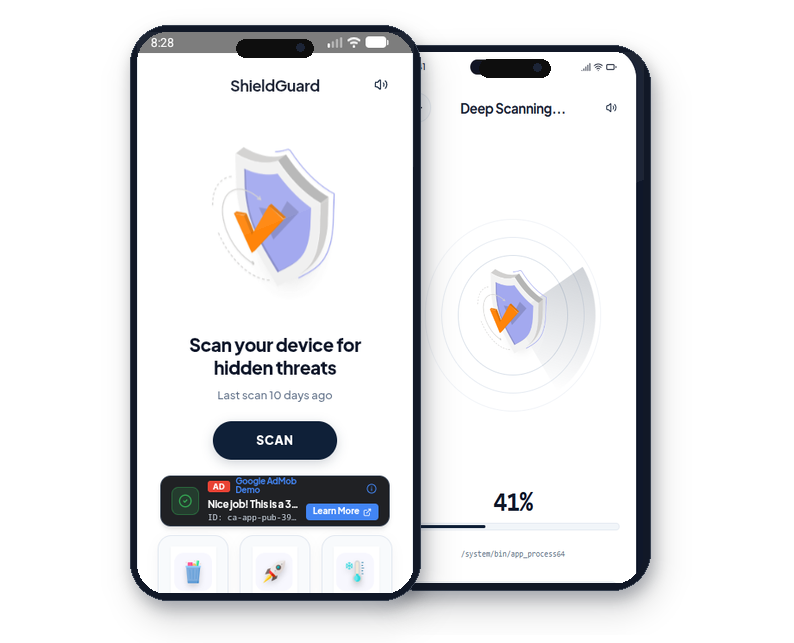
ShieldGuard Mobile Antivirus Showcase

Core Capabilities

Complete Mobile Security & Clean Architecture

ShieldGuard combines heuristic antivirus scanning, hardware storage telemetry, and native Android Accessibility service protection into an ultra-fast, zero-bloat utility.

Deep Threat Scanner

Real-time heuristic malware inspection across installed APKs and background services. Detects security vulnerabilities, suspicious permissions, and potential trojans instantly.

Junk & Storage Cleaner

Intelligent cache optimizer and residual file cleaner. Scans system storage, cleans app caches, temporary files, and reclaims precious gigabytes with a single tap.

Security PIN App Lock

Native security vault protecting sensitive apps like WhatsApp, Photos, Chrome, and Banking apps with 4-digit PIN lock, powered by real-time Accessibility Service sync.

RAM Booster & CPU Cooler

Monitors hardware thermals and system RAM in real-time. Cools down overheating processors and frees memory to maximize gaming smoothness and battery longevity.

100% Offline & Zero Telemetry

Privacy-first security engine executing completely on-device. Zero background tracking, zero analytics leaks, and zero remote data harvesting.

AdMob Monetization Ready

Built-in integration with Google AdMob official demo units for adaptive banner ads and zero-confirmation exit interstitials, ready for plug-and-play revenue.

Engineered for Maximum Speed & Device Safety

Tested rigorously on modern Android versions with zero impact on battery life and negligible memory overhead.

100%

On-Device Scan Coverage

5.5 MB

Ultra-Compact Binary Size

0 KB

Cloud Telemetry Sent

Installation

How to Install ShieldGuard APK

Installing the APK directly on Android takes less than 30 seconds. Follow these 3 simple steps:

Step 1: Download APK

Download the official signed APK file directly to your smartphone.

ShieldGuard.apk (5.5 MB)

Specifications

  • Direct, fast download from VPS
  • Signed Android debug/release key
  • No Google Play login required

Step 2: Allow Unknown Apps

Grant one-time browser permission to install downloaded packages.

Android Settings > Security

What to Expect

  • Tap downloaded file notification
  • When prompted, tap "Settings"
  • Toggle "Allow from this source"

Step 3: Open & Scan

Launch ShieldGuard and activate instant real-time defense.

Instant Protection Active

Included Tools

  • Tap "SCAN NOW" for full check
  • Clean junk cache with one tap
  • Set 4-digit PIN for private apps

Ready to Secure Your Android Device?

Download ShieldGuard APK directly today. Enjoy lightweight 5.5 MB heuristic threat scanning, smart junk cleaning, and native app locking on your device.

Direct APK download hosted on your private VPS server • Clean, fast & signed